 Tori Tao
Make the starting point clear
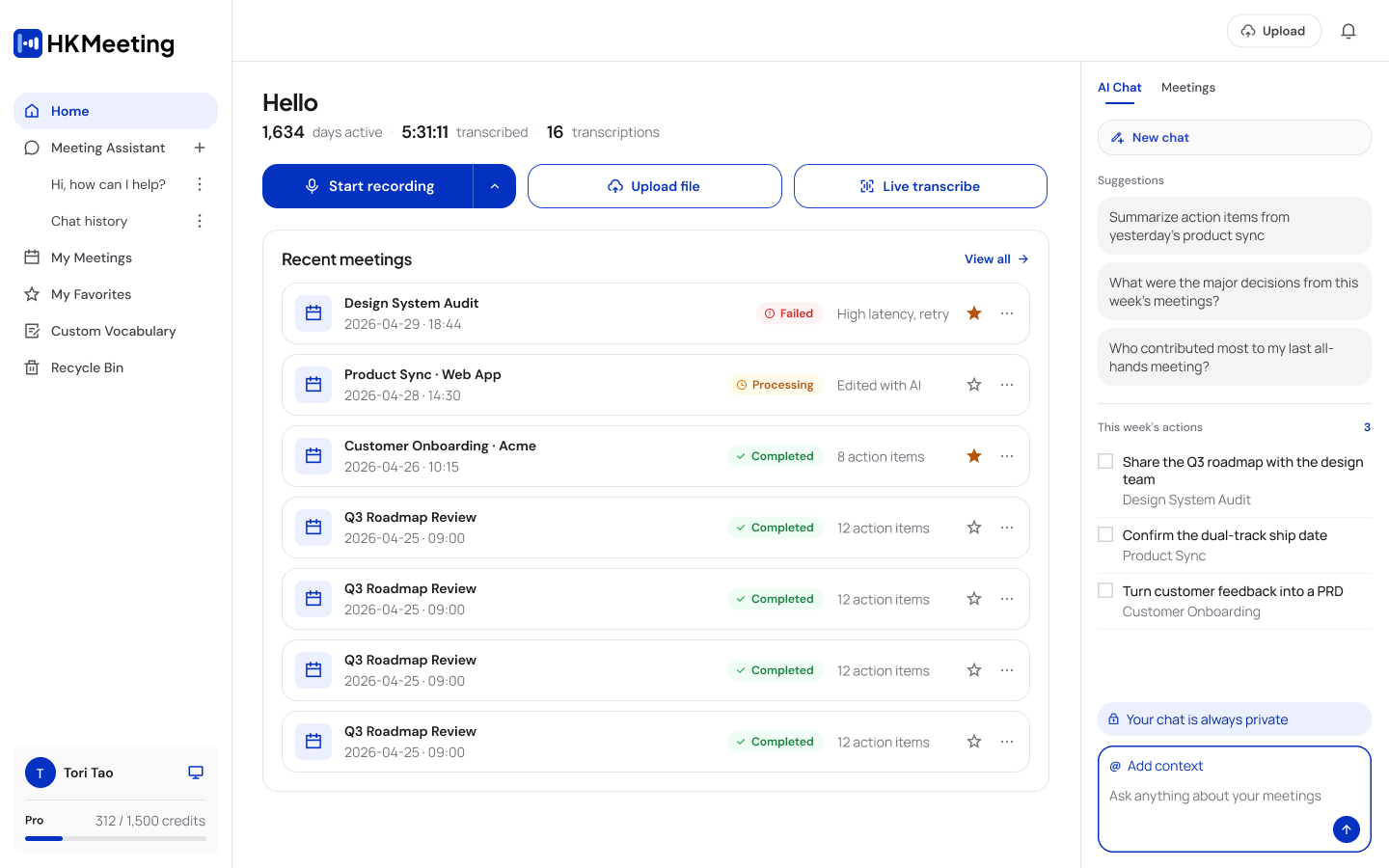
Bring capture options and recent meetings into the workspace, so people can start a new session or return to unfinished work.
 AI MEETING WORKSPACEWeb + Mobile
Capture the meeting. Understand what matters.
Keep the next step within reach.
Speak freely.
Connect seamlessly.
HKMeeting turns conversations into transcripts, summaries, and meeting materials. My work connects the Web workspace and mobile app through a shared experience: start capturing, find what matters, and decide what to do next. This case brings together the original interface redesigns and a working Web prototype.
The product already supported recording and transcription. The design question was how to make that material useful: before a meeting starts, while it is happening, and when someone needs to act on it.
Bring capture options and recent meetings into the workspace, so people can start a new session or return to unfinished work.
Let people move between live transcript, summary, and questions. A useful answer should lead back to what was said.
Separate decisions and action items from the longer record. Keep a path back to the transcript when more context is needed.
Follow a sample meeting from live capture to a saved transcript. Watch the walkthrough in full screen, or take over and explore the workspace yourself.
Interactive prototype · Sample meeting and AI responses. No audio is recorded. You can take over at any point. Open prototype ↗
The prototype retains its original English interface. Walkthrough captions follow the case-study language.
For hands-on exploration of the full desktop workspace, open the prototype at full size. The mobile product is shown below.
Live transcription, translation, and summary share one session. “Catch me up” provides a short answer with source lines, so the reader can check the context behind it.
Recording opens in its own focused workspace. Navigation, other meetings, and the home screen step aside so the transcript and live summary stay in view. Stop & Save returns the completed meeting to review.
Three changes to the existing Web experience. Each makes a different part of the meeting journey easier to read.
The earlier home led with a product introduction. The redesign prioritizes recording setup, recent meetings, and visible processing states, so the next action is part of the workspace.
The earlier detail page had a structured, long-form summary and a separate transcript tab. The updated layout puts the transcript and playback in the main pane, with chapters, decisions, and action items beside it. People can check a takeaway against the original words without leaving the page.
The earlier upload already showed progress. I made it more explicit with percentage, transferred size, and time remaining, then clarified the generated title, when processing can start, and the credit cost.
The Agent proposal brings follow-up work into the same product, with an approval step before sending. It is shown here as an extension of the meeting workspace; the interactive demo uses scripted tasks and sample outputs.
The mobile app carries the same core tasks: start recording, review the summary, and return to the transcript. These original designs remain part of the wider HKMeeting experience.
Upload, record, or begin live transcription.
Review the meeting by topic and conclusion.
Read and edit the transcript beside playback.
Follow the live transcript as the recording continues.
Original mobile designs · Select any screen to enlarge ↗
A working prototype lets a team experience timing, continuity, and control alongside the visual design. It makes questions about the interaction concrete enough to discuss.
The work spans Web and mobile interfaces, before-and-after design comparisons, and a responsive app-download page. The original presentation remains available for the wider design context.
View the original presentation ↗Can someone check an AI takeaway against its source? Is recording status clear while navigating? Can they identify the next action after saving? The prototype makes these tasks concrete enough to test with people who manage real meeting work.